
Manage Subscriptions
The Manage Subscriptions section provides administrators with an audit grid to monitor all active, pending, expired, and cancelled seller SaaS subscriptions.
Subscription Audit Grid
Navigate to: Marketplace Management > Saas Configuration > Manage Subscriptions.
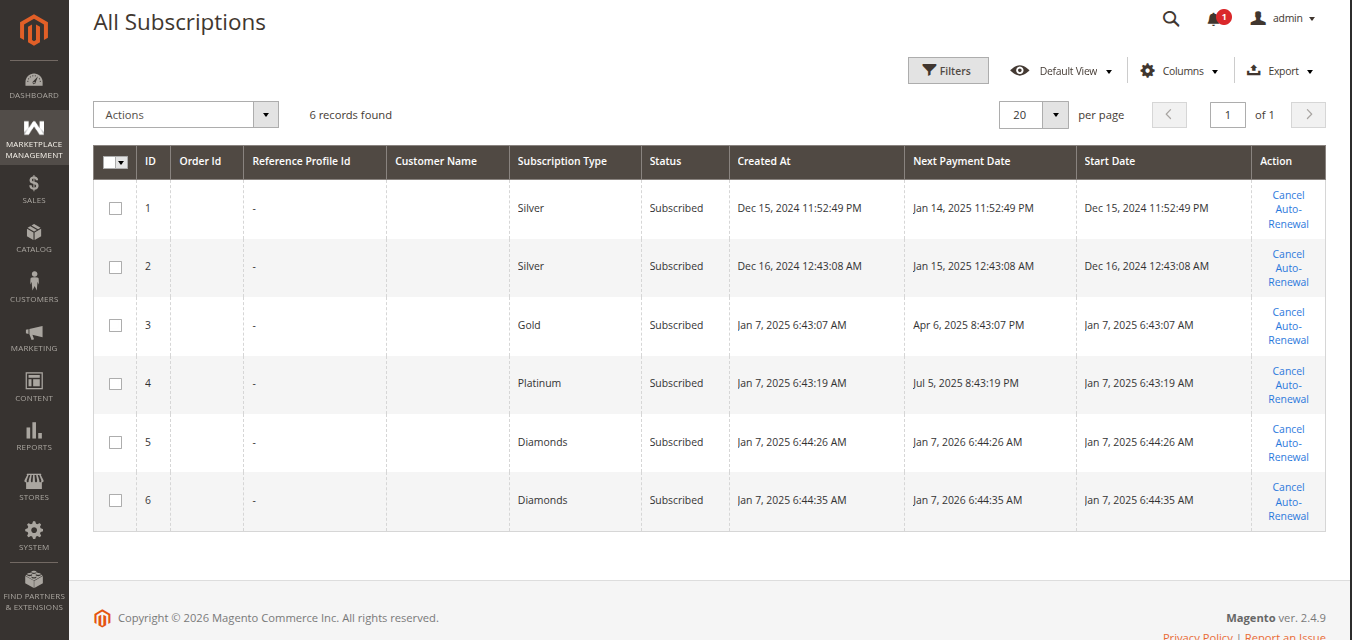 Figure 8.4: Seller subscriptions audit grid with plan and status details.
Audit Grid Columns & Data Points
The grid tracks the complete lifecycle of vendor subscriptions:
| Column Header | Description |
|---|---|
| Subscription ID / Reference | Unique gateway profile identifier (PayPal Billing Agreement ID or Stripe Customer Subscription ID). |
| Seller Name & Store | Vendor identity and associated storefront name. |
| Plan / Duration Title | Name of the membership plan the vendor is subscribed to. |
| Subscription Charge | Amount billed per subscription cycle. |
| Start Date | Date and timestamp when the subscription was initiated. |
| Next Billing Date | Scheduled date for the next automated renewal payment. |
| Status | Current operational status of the subscription (Active, Pending, Expired, or Cancelled). |
Subscription Lifecycle States
Checkout Initiated
→Pending
→Active (0% Commission)
→Expired (Renewal Lapsed)
Cancelled (Terminated)
- Active: The vendor is currently in good standing. Commission calculations are automatically bypassed ($0.00 commission), and subdomain access is fully operational.
- Pending: The subscription checkout was initiated but waiting for gateway confirmation.
- Expired: The subscription reached the end of its duration without successful renewal. Regular marketplace commissions resume.
- Cancelled: The subscription agreement was terminated.