
Promotions Dashboard
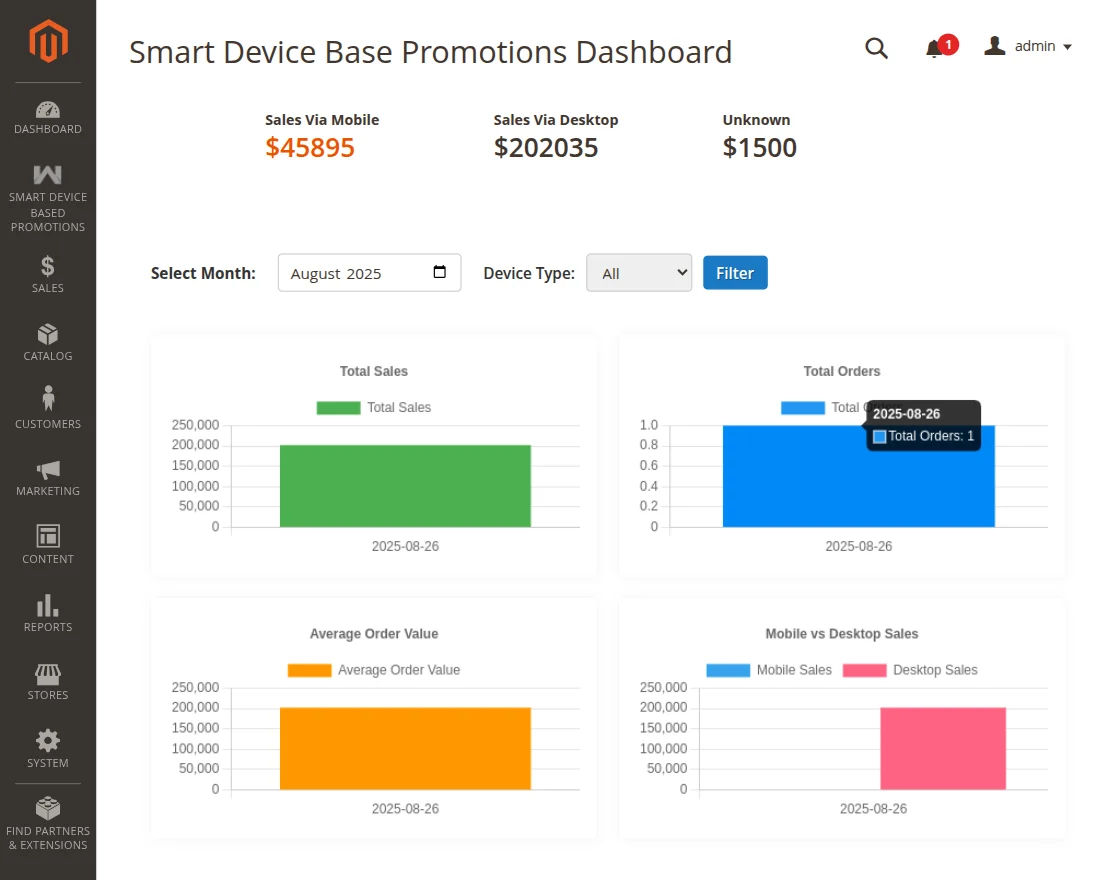
The Promotions Dashboard provides store administrators with an intuitive analytics interface to monitor, compare, and analyze sales performance and revenue attribution driven by device-targeted promotional campaigns.
Navigating to the Dashboard
- Log in to the Magento Admin Panel.
- In the left navigation menu, click Smart Device Based Promotions.
- Select Promotions Dashboard.
Key Performance Metrics
The dashboard visualizes revenue streams broken down by device type, enabling merchants to understand customer purchasing habits:
1. Sales via Mobile
- Aggregates total gross revenue, transaction counts, and average order value generated by shoppers purchasing from smartphone and tablet mobile browsers.
- Demonstrates the direct commercial impact of mobile-exclusive promotions, app-style discount incentives, and mobile banners.
2. Sales via Desktop
- Aggregates sales volume completed by shoppers browsing from standard desktop and workstation browsers (Chrome, Firefox, Safari, Edge).
- Helps measure the effectiveness of desktop-targeted promotional campaigns.
3. Sales via Unknown
- Captures orders where the shopper's device user-agent string was absent, obfuscated, or masked by privacy proxies or headless bots.
Interactive Analytics Filters
Administrators can refine dashboard metrics using the built-in control bar:
- Select Month: Choose a specific calendar month from the dropdown menu to inspect seasonal spikes, holiday campaigns, or period-over-period sales growth.
- Device Type Filter:
- All: Displays comprehensive comparative statistics across all device categories simultaneously.
- Mobile: Filters dashboard graphs and metrics exclusively to mobile device order data.
- Desktop: Isolates metrics exclusively to desktop browser transaction data.
Strategic Campaign Optimization
Merchants can use the Promotions Dashboard insights to drive actionable marketing strategies:
- Targeted Budget Allocation: If the dashboard indicates higher conversion rates on mobile devices, allocate more promotional budget toward mobile-targeted cart discounts or push notifications.
- A/B Testing Discount Thresholds: Test automatic discounts versus coupon codes across mobile and desktop customer segments and compare resulting monthly sales.
- Cart Abandonment Reduction: If mobile sales lag behind desktop volume despite high traffic, implement a mobile-exclusive automatic discount rule to reduce friction during mobile checkout.