
Admin Carrier Settings
To configure global settings for Marketplace USPS Shipping, navigate to: Stores → Configuration → Sales → Delivery Methods → Marketplace USPS.
1. Core Carrier & Credentials
This section manages basic carrier activation, API connectivity, and global payment account identifiers.
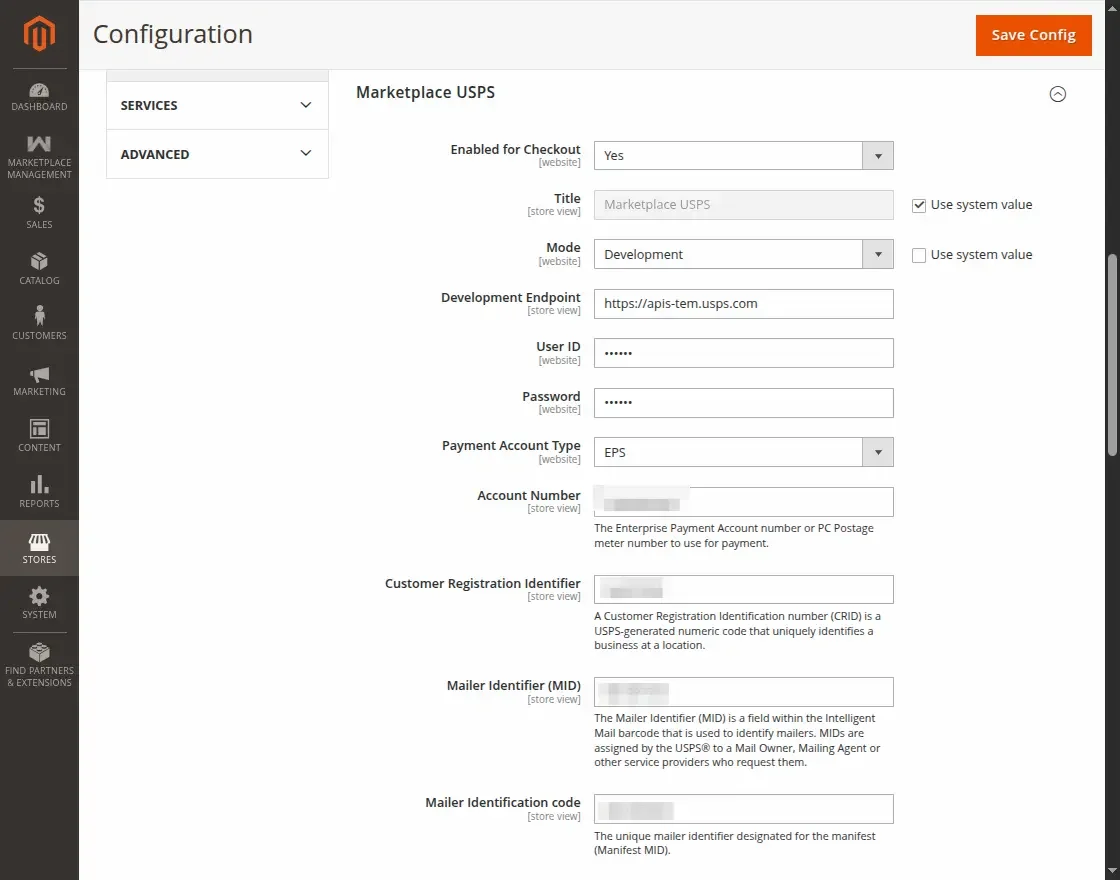
| Setting | Config Path | Default | Description |
|---|---|---|---|
| Enabled for Checkout | carriers/marketplaceusps/active | No (0) | Activates the Marketplace USPS carrier across the storefront. Set to Yes to offer USPS at checkout. |
| Title | carriers/marketplaceusps/title | Marketplace USPS | The label displayed to customers at checkout and in order review summaries. |
| Mode | carriers/marketplaceusps/mode | Development (0) | Switch between Development (test sandbox) and Live (production) USPS endpoints. |
| Development Endpoint | carriers/marketplaceusps/development_url | https://apis-tem.usps.com | The USPS Testing Environment for Mailers (TEM) endpoint URL. |
| Live Endpoint | carriers/marketplaceusps/live_url | https://apis.usps.com | The USPS Production REST API endpoint URL. |
| User ID | carriers/marketplaceusps/userid | (empty) | Your USPS Developer Portal Consumer Key (Client ID). Stored encrypted. |
| Password | carriers/marketplaceusps/password | (empty) | Your USPS Developer Portal Consumer Secret (Client Secret). Stored encrypted. |
| Payment Account Type | carriers/marketplaceusps/account_type | EPS | Postage payment framework: EPS (Enterprise Payment System), METER, or PERMIT. |
| Account Number | carriers/marketplaceusps/account_number | (empty) | The Enterprise Payment Account number or PC Postage meter number. Visible when Account Type is EPS or METER. |
| Permit Number | carriers/marketplaceusps/permit_number | (empty) | The USPS Permit Imprint number. Visible when Account Type is PERMIT. |
| Permit Zip Code | carriers/marketplaceusps/permit_zip | (empty) | The 5-digit US ZIP Code associated with your permit account. Visible when Account Type is PERMIT. |
| Customer Registration Identifier | carriers/marketplaceusps/usps_crid | (empty) | A unique USPS-assigned numeric business location identifier (CRID). |
| Mailer Identifier (MID) | carriers/marketplaceusps/usps_mid | (empty) | 6 or 9-digit Mailer ID used in Intelligent Mail barcodes. |
| Mailer Identification code | carriers/marketplaceusps/usps_manifestmid | (empty) | Designated Manifest MID used for USPS electronic manifests. |
2. Allowed Mail Classes & Methods
Configure the specific USPS service lines available to buyers for domestic (US) and international shipments.
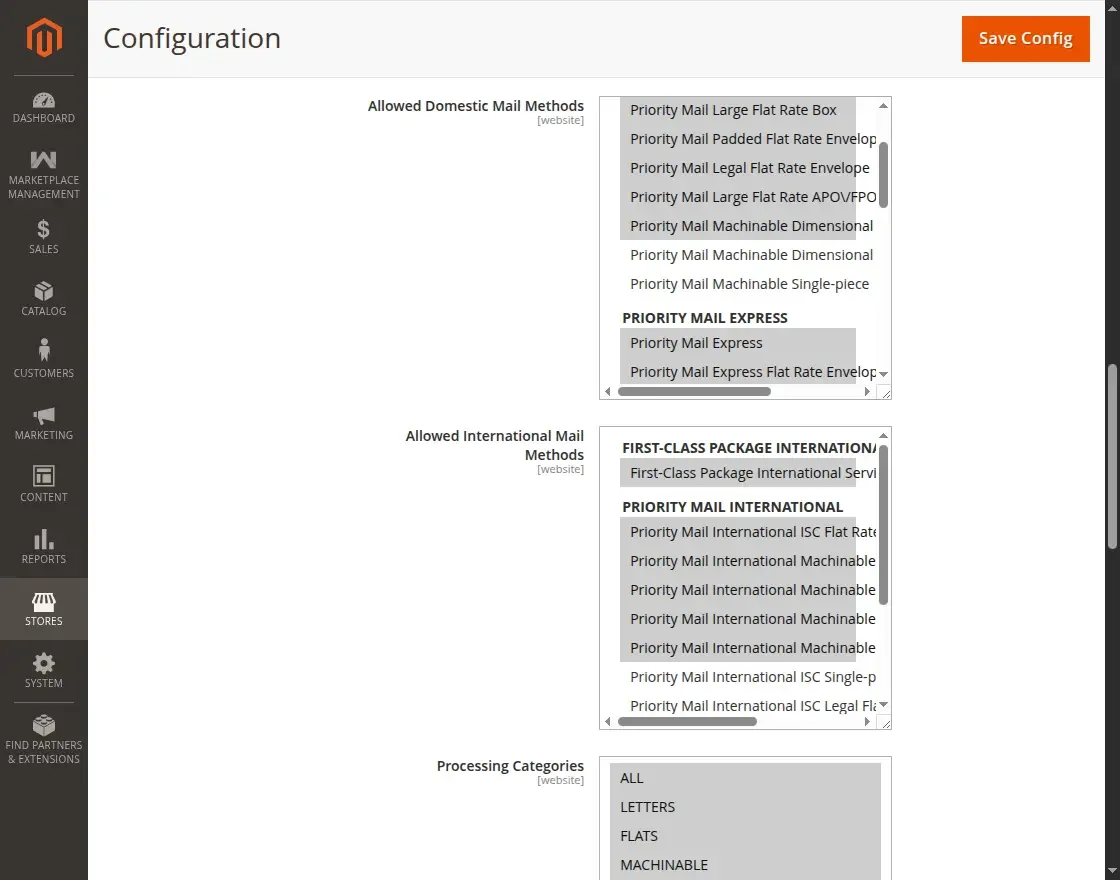
| Setting | Config Path | Description |
|---|---|---|
| Allowed Domestic Mail Methods | carriers/marketplaceusps/domestic_allow_methods | Multiselect of permitted US domestic mail services, including USPS Ground Advantage, Priority Mail, Priority Mail Express, and Library Mail. |
| Allowed International Mail Methods | carriers/marketplaceusps/international_allow_methods | Multiselect of permitted cross-border services, including Priority Mail International, Priority Mail Express International, and First-Class Package International Service. |
| Processing Categories | carriers/marketplaceusps/processing_category | Mail classification category: ALL, LETTERS, FLATS, MACHINABLE, or NONSTANDARD. Defaults to ALL. |
| Maximum Package Weight | carriers/marketplaceusps/max_package_weight | Maximum single package weight supported by the carrier. Defaults to 70 lbs (USPS standard parcel limit). |
Required Methods Configuration
At least one domestic and one international method must be selected. If this setting is empty, Carrier::collectRates() returns no rates, even if credentials are valid.
3. Handling Fees & Shipping Rules
Configure optional merchant markups, free shipping thresholds, and country restrictions.
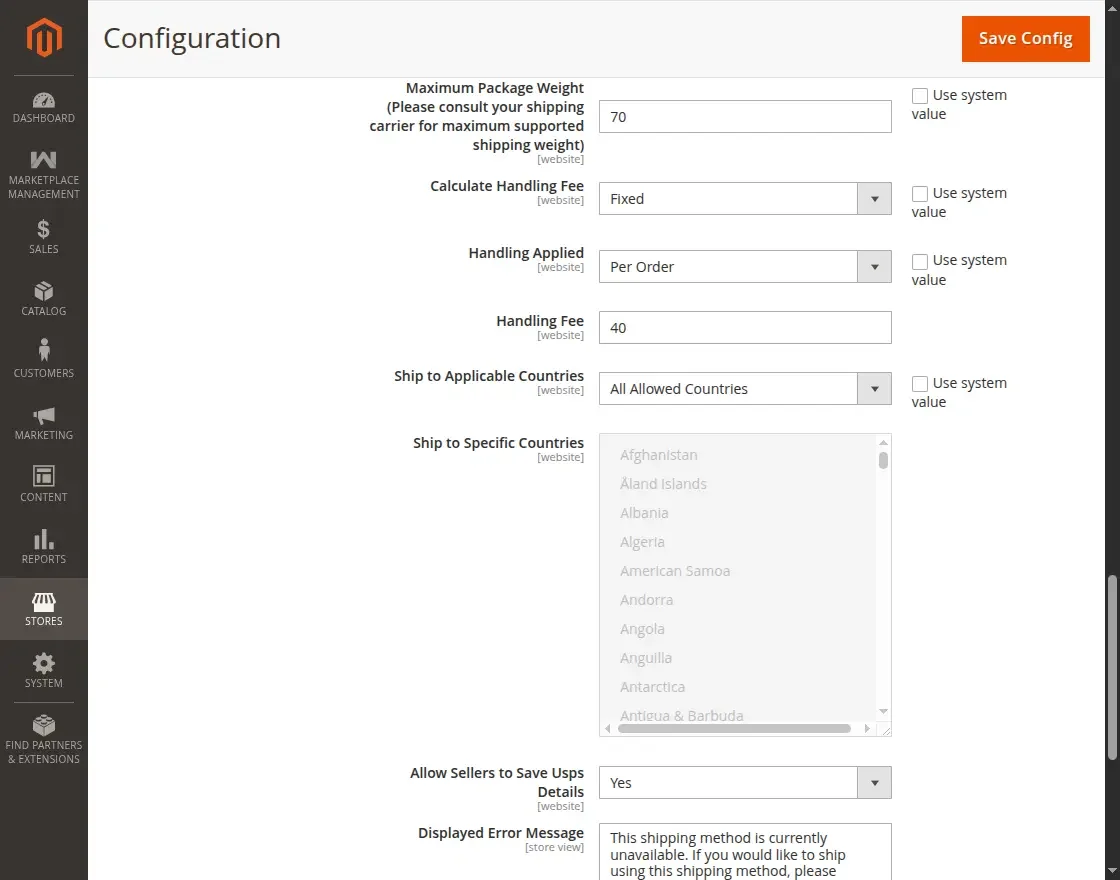
| Setting | Config Path | Default | Description |
|---|---|---|---|
| Enable Free Shipping Threshold | carriers/marketplaceusps/free_shipping_enable | No (0) | Enable automatic free shipping when a cart subtotal threshold is reached. |
| Free Method | carriers/marketplaceusps/free_method | (empty) | Select which USPS mail class becomes free when the threshold is met. |
| Free Shipping Amount Threshold | carriers/marketplaceusps/free_shipping_subtotal | (empty) | Minimum cart subtotal amount required to trigger free shipping. |
| Calculate Handling Fee | carriers/marketplaceusps/handling_type | Fixed (F) | Choose Fixed dollar amount or Percent calculated from the base shipping rate. |
| Handling Applied | carriers/marketplaceusps/handling_action | Per Order (O) | Apply handling fee once Per Order or multiply Per Package. |
| Handling Fee | carriers/marketplaceusps/handling_fee | 0 | Surcharge amount added to the quoted rate. |
| Ship to Applicable Countries | carriers/marketplaceusps/sallowspecific | All Allowed (0) | Allow shipping to all countries configured in store general settings or restrict to specific countries. |
| Ship to Specific Countries | carriers/marketplaceusps/specificcountry | (empty) | Multiselect of allowed destination countries when specific countries is selected. |
| Allow Sellers to Save Usps Details | carriers/marketplaceusps/allow_seller | No (0) | Set to Yes to allow marketplace sellers to configure their own USPS Developer credentials in their vendor portal. |
| Displayed Error Message | carriers/marketplaceusps/specificerrmsg | (standard text) | Message presented to buyers when USPS rates cannot be calculated for the cart. |
| Show Method if Not Applicable | carriers/marketplaceusps/showmethod | No (0) | If set to Yes, displays the carrier title with the error message even when unavailable. |
| Debug | carriers/marketplaceusps/debug | No (0) | When enabled, logs all outgoing USPS REST requests, payloads, and responses to var/log/mpusps_logger.log. |
4. Label Settings (mpusps_label)
These parameters control defaults when generating USPS PDF shipping labels via the USPS Labels API.
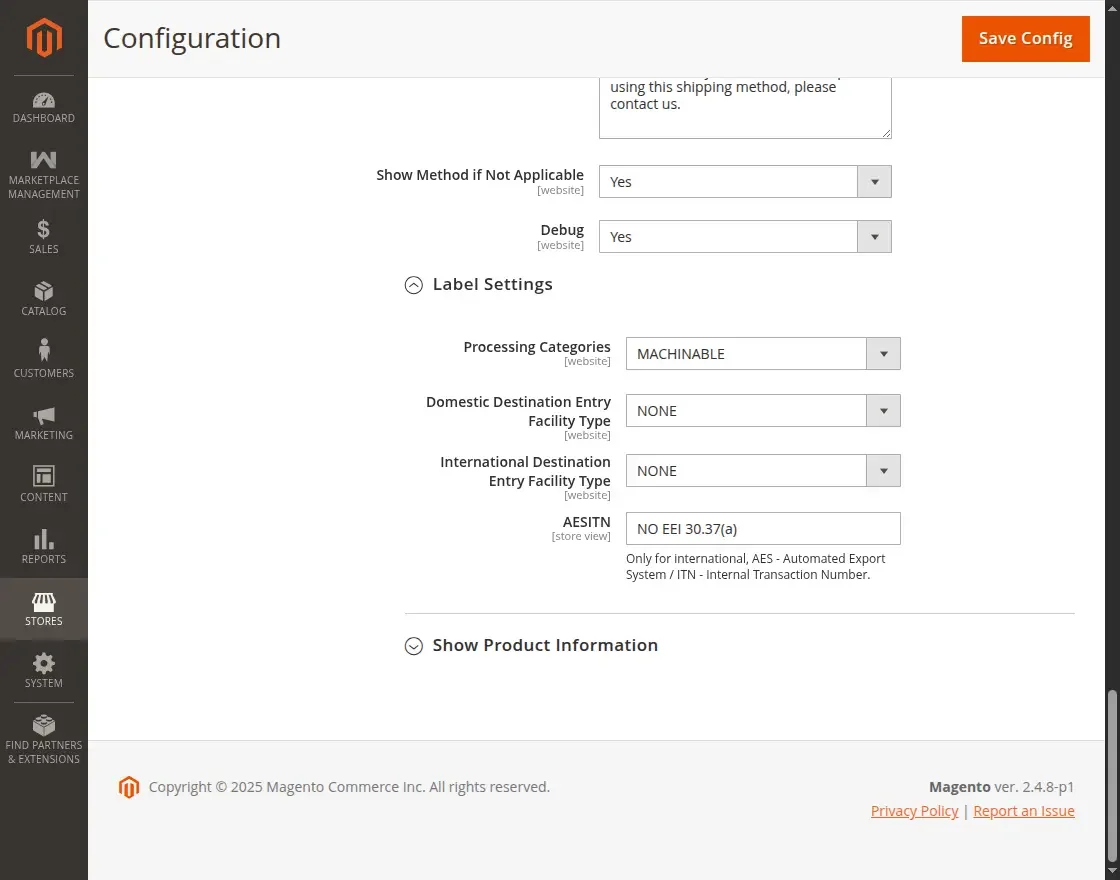
| Setting | Config Path | Default | Description |
|---|---|---|---|
| Processing Categories | carriers/marketplaceusps/mpusps_label/processing_category_label | MACHINABLE | Parcel physical category for barcode creation (MACHINABLE, NON_MACHINABLE, etc.). |
| Domestic Destination Entry Facility Type | carriers/marketplaceusps/mpusps_label/d_destination_entry_facility_type | NONE | Entry facility type for domestic parcels (NONE, DNDC, DDU, DSCF). Helps optimize drop-off discounts. |
| International Destination Entry Facility Type | carriers/marketplaceusps/mpusps_label/i_destination_entry_facility_type | NONE | Facility entry classification for international routing. |
| AESITN | carriers/marketplaceusps/mpusps_label/usps_aesitn | NO EEI 30.37(a) | Automated Export System Internal Transaction Number for international customs compliance. Defaults to standard commercial exemption NO EEI 30.37(a). |