
Installation
You can install the AI Content Generator module either manually via file copy or through Composer (recommended if packaged in a repository).
Method 1: Manual Installation (File Transfer)
Central Base Dependency
Because the module depends on the centralized licensing library, you must also copy the Webkul_Base module code into your Magento directory at:
app/code/Webkul/Base
If the base module is missing, Magento compilation and setup upgrades will fail with dependency errors.
Extract Archive: Extract the zipped code packages for both modules.
Move Files: Copy the extracted folder structures into your Magento root directory:
- AI Content Generator:
app/code/Webkul/AIContentGenerator - Base License Utility:
app/code/Webkul/Base
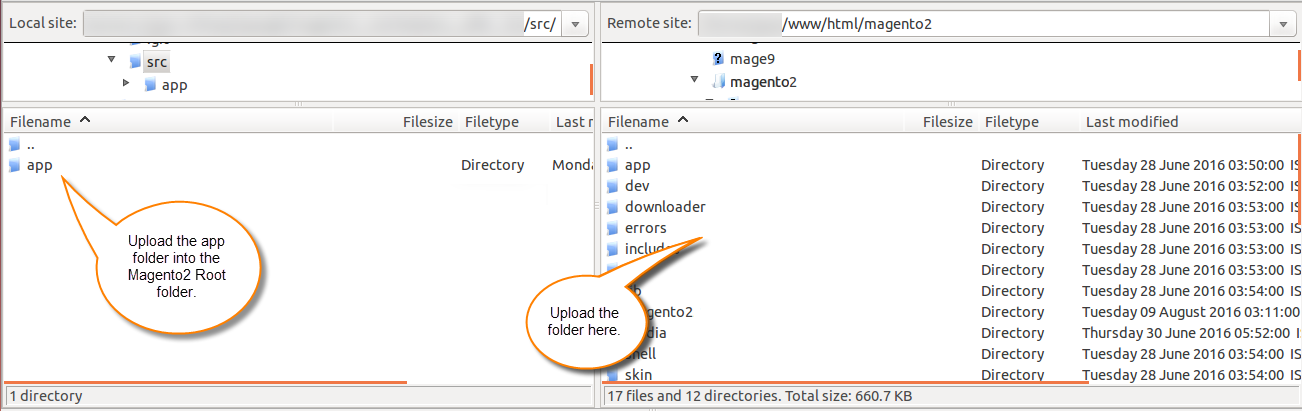
- AI Content Generator:
Set Permissions: Ensure the file permissions and ownership match your Magento user (e.g.
chown -R www-data:www-data app/code/Webkul/AIContentGenerator app/code/Webkul/Base).
Installing Provider Packages (Symfony AI)
Selective Provider Installation
You do not need to install all provider packages listed below. You can install only the packages for the specific AI providers you intend to use, and you can easily install additional provider packages in the future as your requirements expand.
Core Platform & Agent Packages
composer require symfony/ai-platform:"0.12.*"
composer require symfony/ai-agent:"0.12.*"
Provider Bridges (Install for active providers)
composer require symfony/ai-open-ai-platform:"0.12.*"           # OpenAI
composer require symfony/ai-open-router-platform:"0.12.*"       # OpenRouter
composer require symfony/ai-gemini-platform:"0.12.*"            # Gemini
composer require symfony/ai-anthropic-platform:"0.12.*"         # Anthropic
composer require symfony/ai-cerebras-platform:"0.12.*"          # Cerebras
composer require symfony/ai-deep-seek-platform:"0.12.*"         # DeepSeek
composer require symfony/ai-cohere-platform:"0.12.*"            # Cohere
Method 2: Composer Installation (If available)
Run the composer require command to automatically download the module and dependencies:
composer require webkul/ai-content-generator
Post-Installation Commands
Once the code is in place, compile, update the database schemas, and deploy static assets:
Enable Module:
bin/magento module:enable Webkul_AIContentGeneratorRun Setup Upgrade:
bin/magento setup:upgradeRecompile Code:
bin/magento setup:di:compileDeploy Static Content:
bin/magento setup:static-content:deploy -fFlush Caches:
bin/magento cache:flushStart Background Queue Consumers:
bin/magento queue:consumers:start webkulChatgptCategoryMassActionConsumer &
bin/magento queue:consumers:start webkulChatgptProductMassActionConsumer &